



All figures and product details verified against HubSpot's official documentation, plus a HubSpot-run webinar, August 2026
Short answer: Aside from the default agents that HubSpot provides like Prospecting Agent, Customer Agent, etc there are two distinct ways to build your own Custom Agent. First you can describe it in plain language and Breeze Assistant will assemble instructions, actions, and knowledge for you. Alternatively, you can build it as a step inside an agentic workflow on the new canvas-based builder. Both run on live CRM data, both are free to test, and both start consuming HubSpot Credits the moment you publish and they run for real.
Agent Hub and the new workflow builder are both still in BETA at the time of writing, so specifics below will keep shifting. Information in this article is taken from HubSpot's official documentation as well as a HubSpot user group ran by HubSpot Senior PM, Becca Stamp, August 2026.
How to plan your custom agent before building it out
Think of your custom agent like a new team member joining your team. Before you build an agent, make sure you have a clear idea of what pain point and KPI is this teammate responsible for, what data do they need read or write access to, and what knowledge (case studies, playbooks, prior tickets) do they need to do the job well. Every custom agent in Agent Hub is built from these same three components, regardless of which builder you use:

Instructions
Set the goal, method and a desired output for your agent. Through these instructions you are telling the Agent what problem it exists to solve, how it should do it and what outputs it should return.
.png?width=288&height=288&name=Instructions%20(1).png)
Actions
What can the agent do? Should the agent be able to read CRM data only or does it need the ability to update records, add notes, etc. Consider this carefully based on the instructions. An agent without the required actions won't be able to give you the result you want.

Knowledge
Reusable va of internal documentation, competitive battlecards, templates, playbooks and anything else that this agent might need in order to successfully complete the goal you have given it.
Two Ways to Build Agents
The first option is a truly custom agent building experience. You're giving the agent a clear goal the ability to meet that goal and the knowledge it might need. The second option HubSpot positions as building an 'Agentic Workflow'. This is essentially a workflow as you know it with elements of AI and Agent processes built into it's actions.
To the Ogham Works theme this feels more like building a workflow with additional capabilities including triggering one of the HubSpot created agents or your newly created custom agent. Not quite an 'agent' but more a means to include agentic behaviour in your automations. But let's get into both of these options in more detail.
Building your HubSpot agent in natural language
Navigate to the 'Agents' tab in your HubSpot Navigation bar and select 'Agent Hub'
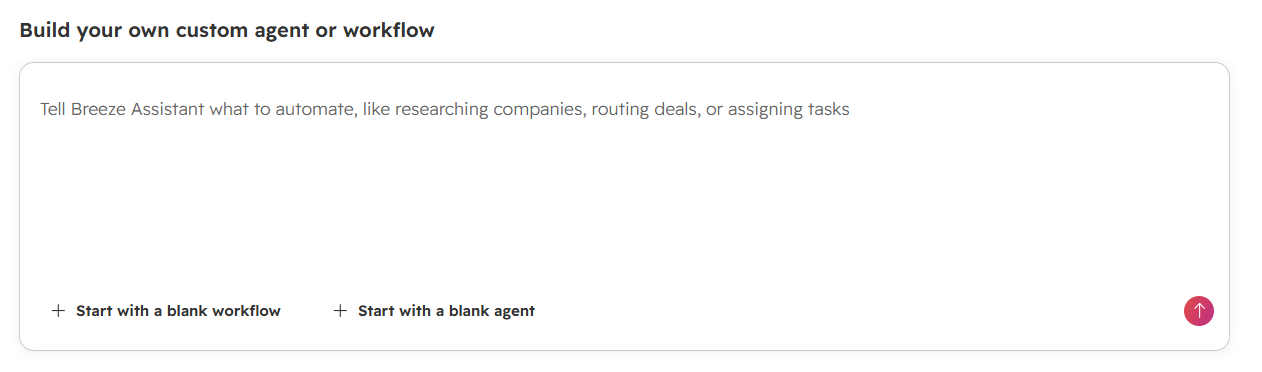
From here you will see the option to 'build your own custom agent or workflow'. I recommend just selecting the option to 'Start with a blank agent' as seen below:
This will bring you to the screen below where you can apply the planning of instructions, actions & knowledge from the above section. You'll notice also that breeze ai will open on the side of your builder and help you to update and edit your agent in real time.
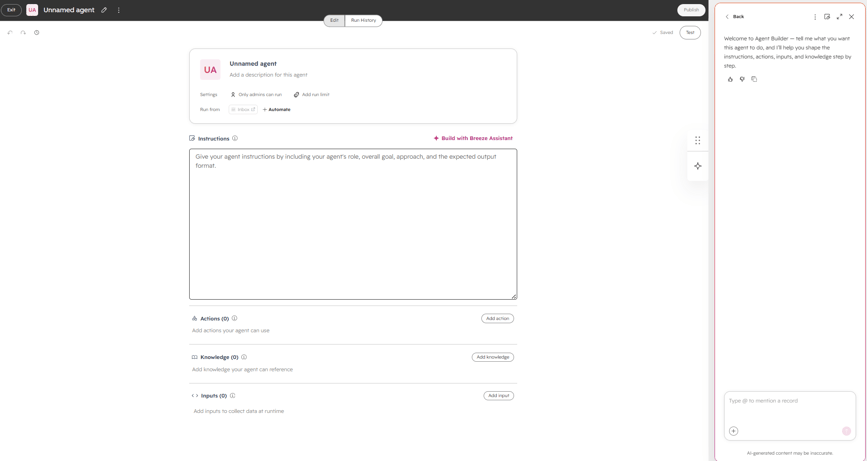
Using Breeze AI to create your agent won't cost you any credits and allows you to enter your prompts in natural human language and have Breeze convert it into a structured prompt for the agent that ensure everything works nice and smoothly.
Building Your Agent as an Agentic Workflow
Although HubSpot themselves refers to this as a 'second option' for building an agent it has a different place, in our opinion. It is more like adding AI and agent actions into your automated workflows including triggering agents you have created.
You can access this option by selecting Agents > Agent Hub > Create > Workflow or directly from the workflows tool itself.
Doing so will bring you to the screen below:
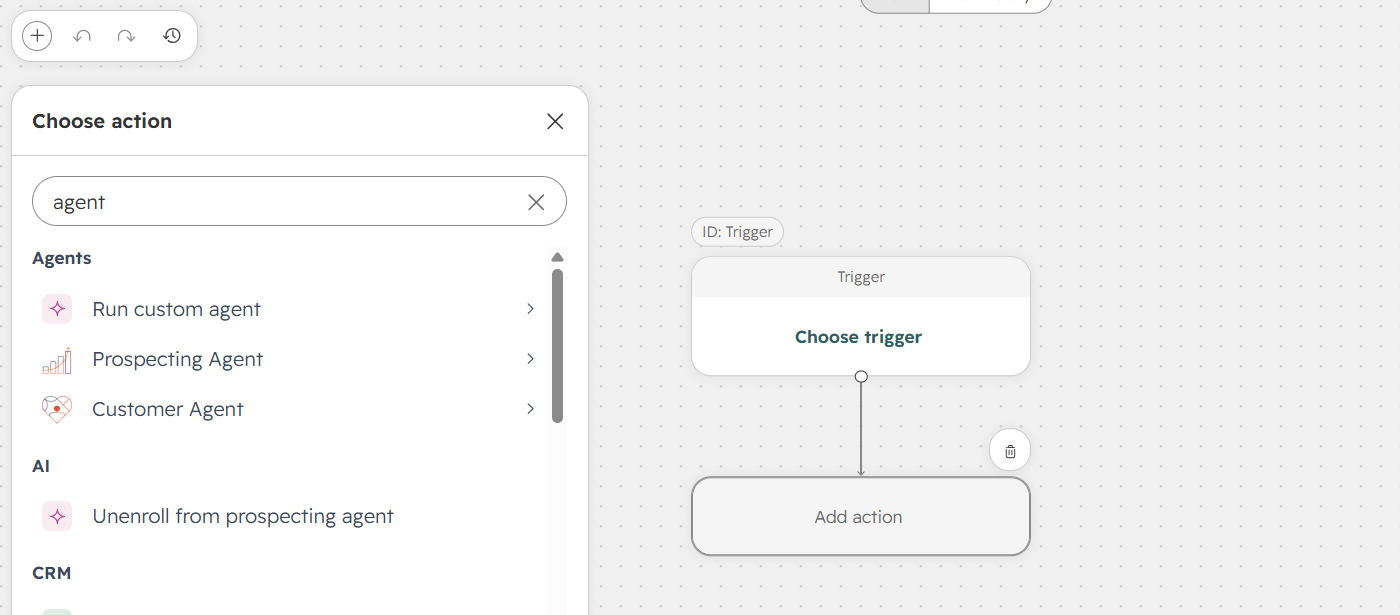
Here you'll see most of the same workflow actions as before but also new actions related to Agents and AI such as triggering custom agents you built in the workflow.
Noteworthy with this workflow building experience is that workflows here are no longer object specific. Meaning you can pull contacts, companies, deals, etc into the same workflow rather than selecting an initial workflow type.
Classic, object-specific workflows still exist in Automation for now. When questioned, the HubSpot team said the intention is for legacy workflows to eventually move to this new Agentic Workflow building experience but there's no committed timeline or forced cutover yet, so treat it as stated direction rather than a locked roadmap. HubSpot's own comparison of the two systems is worth reading before you commit a business-critical process to the new builder: Agent Hub vs. legacy workflows.
Which of the two build paths should you use?
| Breeze Assistant (natural-language builder) | Agentic Workflows | |
|---|---|---|
| How you build | Chat with Breeze Assistant; it breaks your description into Goal, Method, Output, and Actions & Tools | Drag-and-drop specific actions rather than building out a prompted agent. Closer in feel to Zapier or similar tools |
| Best for | A single agent with a clear job e.g. a Customer Health Agent that scores accounts and flags risk | Multi-step processes where an agent is one step among several, including non-HubSpot triggers, CRM updates, sending communications and more |
| Editing | Keep chatting with Breeze Assistant to adjust it | Rearrange steps directly on the in the workflow tool, change settings much like the classic workflow tool |
If you're building one agent to do one job like scoring, summarising or drafting then start with Breeze Assistant. If the outcome depends on multiple steps, external tools, or an event outside HubSpot, build it as an agentic workflow instead.
Does building or running an agent cost HubSpot Credits?
We all love a sandbox testing environment. So thankfully HubSpot have included testing as part of the agent building experience. You can test your agent out to make sure everything works as expected and the great news is testing costs nothing, in either builder. HubSpot's own documentation confirms that testing an agent consumes no credits so you only start paying once it's published and actually runs live.
Once you publish and run an agent, credits do apply, and it's impor them before you flip it on:
- Credits cost $0.01 USD each, and are only consumed when an agent completes a configured action. Just turning on the agent won't cost you anything.
- All agents started consuming HubSpot Credits from July 23, 2026, with the full agent builder available to Professional and Enterprise subscriptions.
- As before, a regular workflow with no agent step doesn't draw on the credit pool at all. Credits only get used once an agent (rather than a static action) does the work inside that workflow.
- Unused credits expire at the end of the month and don't roll over, and your highest-tier subscription determines your allotment when you run multiple HubSpot products.
- In the agent builder, you can set a monthly run limit per agent, and HubSpot shows you a dynamically updating estimate (e.g. "900–1,000 credits/month") as you adjust that limit.
During a recent webinar session with HubSpot it was brought up that individual agent runs were shown coming in around 100 credits each, and a Professional-tier account's monthly allotment sits around 5,000 credits. This means a Professional account can expect somewhere in the region of 50 agent runs a month before it needs to buy more credits, depending on the agent's complexity. HubSpot said directly that they're aware this per-run cost is high for some use cases and are working to bring it down but as always treat that as a stated intention, not a committed roadmap date.
For the live, dynamic version of your own account's numbers, HubSpot's guide on reviewing estimated credit costs is the one to check before launch as credit pricing is exactly the kind of detail that goes stale fast.
Where is HubSpot taking this next?
A few things came up in the session that aren't in HubSpot's public documentation yet, so treat them as stated direction rather than shipped fact:
- HubSpot's product team, confirmed on the call that the new Agent Hub workflow builder is intended to eventually replace the classic Automation workflow tool, not sit alongside it indefinitely.
- HubSpot said it expects to start showing within the UI which legacy workflows are compatible with the new builder and can be moved over within the next weeks. This implies an assisted migration path is coming.
- Longer term, HubSpot's stated ambition is for the new builder's external triggers to reduce the need for tools like Zapier and n8n, by continuing to add more external apps as workflow triggers over time.
None of this is committed or dated beyond "next few weeks" for the compatibility flagging, so don't plan a migration around it yet.
FAQ
Do I need Enterprise to use Agent Hub's custom agent builder? No — Professional and Enterprise accounts both get access to the agent builder; credits are what's metered, not access to the builder itself.
Will my classic HubSpot workflows stop working? No — classic, object-specific workflows still run in Automation. HubSpot is planning to flag which ones can move to the new builder in the coming weeks, but there's no forced cutover as of this writing.
Does testing an agent cost credits? No. Testing is free in both the Breeze Assistant builder and the agentic workflow canvas, and test runs never send messages or update live records.
What's the difference between a "workflow" and an "agent" in Agent Hub? A workflow is the automation itself — trigger and actions. An agent is a component you can drop into that workflow (or run standalone) that uses instructions, actions, and knowledge to make a judgment call rather than just execute a fixed rule.
Can a new-builder workflow trigger from outside HubSpot? Yes — Google Sheets, Asana, and Jira were named specifically as supported external triggers, with more tools expected to be added over time.
Are all workflow actions available for all accounts now? No. While there are new actions available, certain ones still require specific packages — enrolling in sequences requires Sales & Service Enterprise, and Custom Code actions require Data Hub Professional.
.png?width=352&name=How%20to%20Automate%20HubSpot%20Sequence%20Enrollment%20(1).png)
Leave a Comment